


Hairstyles for Oval Face: Try Them on Your Photo
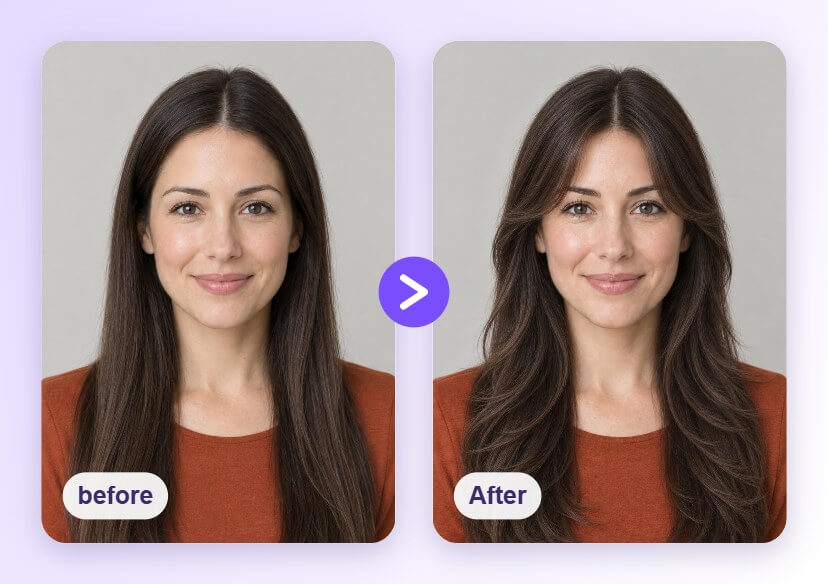
An oval face suits many cuts, so the hard part is choosing. Upload a front-facing photo and preview long layers with curtain bangs, a sleek bob and a wavy lob with the AI Hairstyle Generator before you book a salon visit.





How to Preview Hairstyles for an Oval Face

Upload a Clear Photo
Choose a well-lit, front-facing photo with your hairline and hair visible. A plain background helps the AI tell your hair apart from the rest of the picture.

Pick a Hairstyle
Open the AI Hairstyle Generator and tap a style from the library, such as long layers, a sleek bob or a wavy lob, to see it applied to your photo.

Compare and Save
Try a few cuts, compare them with your original photo and save the ones you like. Bring the saved images to your stylist as a visual reference.
Long Layers with Curtain Bangs
Long layers add movement, and curtain bangs frame the face. Preview the length and the bangs on your own photo to see whether the look feels right for you.
Try a Sleek Jaw-Length Bob
A clean bob at jaw length is a classic choice, and an oval face has room to try it with a side part or a center part. Preview both on your photo.
A Shoulder-Length Lob with Waves
A lob keeps some length, and loose waves give it a relaxed finish. Preview it on your photo and compare it with the other styles above.
Why Oval Faces Have Many Options
Hairstyles for Oval Face FAQs
Which hairstyles suit an oval face?
Many do. Long layers, curtain bangs, a jaw-length bob and a wavy lob are popular choices. Preview a few on your photo to see which one you like best.
How do I know if I have an oval face?
An oval face is usually longer than it is wide, with a forehead a little wider than the chin and a softly curved jaw. The Face Shape Detector can help you check.
Can I preview bangs before cutting them?
Yes. Apply a hairstyle with bangs to your photo to see how it frames your face before you visit the salon.
Is the preview exactly how my hair will turn out?
No. The result is a visual preview on your photo. Real results depend on your hair texture, thickness, growth pattern and your stylist's technique, so use the preview as a reference and talk it through with your stylist.
What kind of photo gives the best result?
A clear, evenly lit, front-facing photo works best. Keep your hairline and face visible and avoid heavy shadows or objects covering your hair.

