


Hairstyles for Thin Hair: Try Them on Your Photo
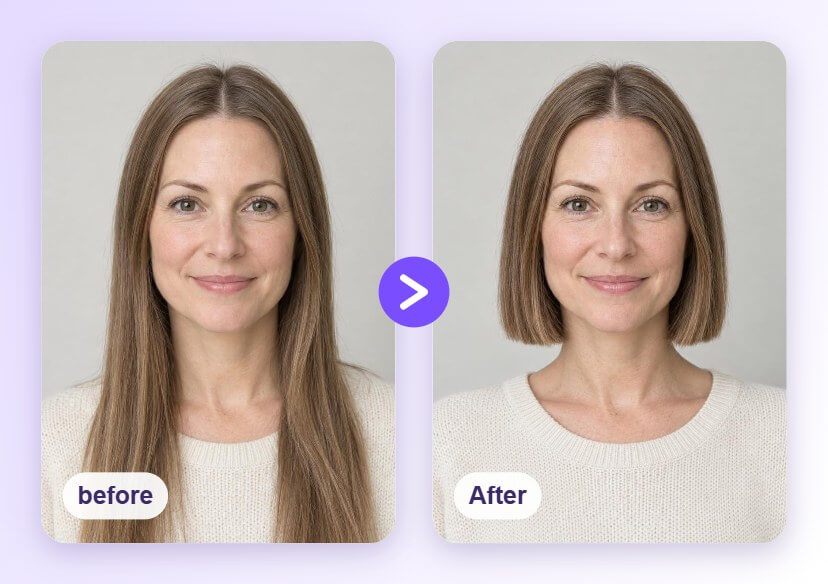
Fine or thin hair can look flat in the wrong cut. Upload a front-facing photo and preview a blunt bob, a textured pixie and soft layers with the AI Hairstyle Generator, then choose the shape you like before you visit the salon.





How to Preview Hairstyles for Thin Hair

Upload a Clear Photo
Choose a well-lit, front-facing photo with your hairline and hair visible. A plain background helps the AI tell your hair apart from the rest of the picture.

Pick a Hairstyle
Open the AI Hairstyle Generator and tap a style from the library, such as a blunt bob, a textured pixie or a layered cut, to see it applied to your photo.

Compare and Save
Try a few cuts, compare them with your original photo and save the ones you like. Bring the saved images to your stylist as a visual reference.
See a Blunt Bob on You
A blunt, even line can make fine hair look more solid at the ends. Preview a chin-length bob on your own photo and decide how short you want to go.
Try a Textured Pixie
Short cuts with soft volume on top can suit fine hair because there is less length to weigh it down. See how a textured pixie looks with your face shape before you commit.
Soft Layers at Collarbone Length
If you want to keep some length, light layers and loose waves add movement. Preview face-framing layers on your photo and compare them with your current hair.
Why Cut Choice Matters for Fine Hair
Hairstyles for Thin Hair FAQs
What is the best haircut for thin hair?
There is no single best cut. Blunt bobs, short textured cuts and light layers are common choices because they can make hair look fuller, but the right one depends on your face shape and how much hair you have. Preview a few on your photo and compare.
Is fine hair the same as thin hair?
Not exactly. Fine hair means each strand is narrow, while thin hair means there are fewer strands overall. Many cuts suit both, and a stylist can tell you which applies to you.
Can I preview a short cut before cutting my hair?
Yes. You can apply a short style to your photo and see how it looks on your face before you visit the salon. It is an easy way to test a big change without any commitment.
Will the preview show how full my hair really looks?
No. The result is a visual preview of the shape on your photo. Real fullness depends on your hair density, texture and styling, so use it as a reference and talk it through with your stylist.
What kind of photo gives the best result?
A clear, evenly lit, front-facing photo works best. Keep your hairline and face visible and avoid heavy shadows or objects covering your hair.

