
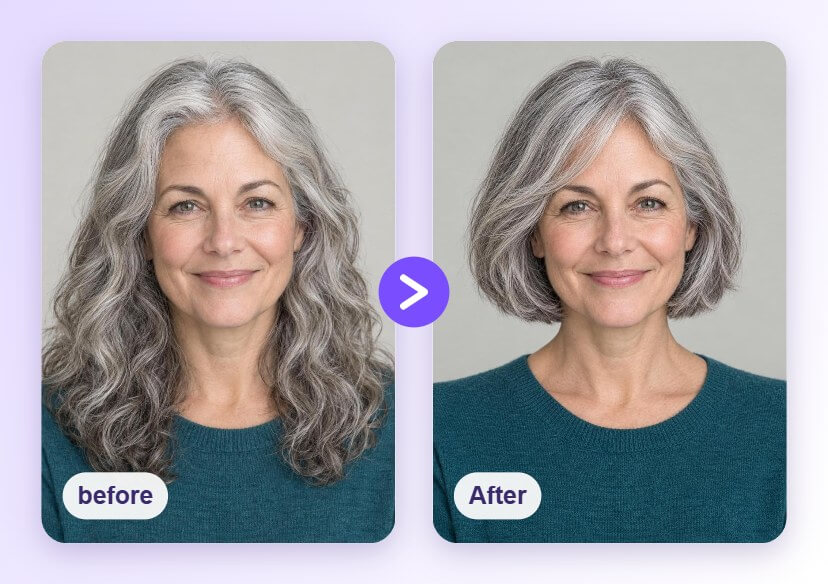


Hairstyles for Women Over 50: Try Them on Your Photo
Not sure which cut suits you? Upload a front-facing photo and preview a bob, a pixie, a long bob and more with the AI Hairstyle Generator, so you can choose a look with confidence before you book a salon visit.





How to Preview Hairstyles for Women Over 50

Upload a Clear Photo
Choose a well-lit, front-facing photo with your hairline and face visible. A plain background helps the AI tell your hair apart from the rest of the picture.

Pick a Hairstyle
Open the AI Hairstyle Generator and tap a style from the library, such as a bob, a pixie or a sleek long bob, to see it applied to your photo.

Compare and Save
Try a few cuts, compare them with your original photo and save the ones you like. Bring the saved images to your stylist as a visual reference.
See a Chin-Length Bob on You
A bob keeps hair neat and easy to style, and a soft side-swept fringe frames the face. Preview the length and the fringe on your own photo first, then decide whether a chin-length or a longer bob feels right for you.
Try a Short Pixie Cut
Thinking about going short? A pixie is a big change, so a preview helps. See how a short textured cut sits with your face shape and hairline before you commit to the scissors.
Try a Sleek Long Bob
Not ready for short hair? A sleek long bob keeps most of your length and adds a clean, polished line. Preview a center part and straight ends on your own photo and compare it with your current style.
Choosing a Cut by Hair Type and Face Shape
Hairstyles for Women Over 50 FAQs
How do I find a hairstyle that suits me after 50?
Upload a front-facing photo to the AI Hairstyle Generator and try several lengths, such as a bob, a pixie and soft layers. Compare each one with your original photo, and keep your hair type and face shape in mind when you choose.
Can I preview a short cut before cutting my hair?
Yes. You can apply a short style to your photo and see how it looks on your face before you visit the salon. It is an easy way to test a big change without any commitment.
Which hairstyles can I try?
The AI Hairstyle Generator offers a library of short, medium and long styles. Open the tool to see the styles currently available, since the library can change over time.
Is the preview exactly how my hair will turn out?
No. The result is a visual preview on your photo. Real results depend on your hair texture, thickness, growth pattern and your stylist's technique, so use the preview as a reference and talk it through with your stylist.
What kind of photo gives the best result?
A clear, evenly lit, front-facing photo works best. Keep your hairline and face visible and avoid heavy shadows or objects covering your hair.

