






Free AI Image Upscaler: Upscale Image to 4K Batch Online
YouCam's AI Image Upscaler batch enhances JPG, PNG, TIFF, and GIF images, enlarging them by 2X or 4X up to 4K resolution without losing quality. Sign up now and get 2 free upscales per day!

Why Choose YouCam's AI Image Upscaler?
- Enlarge Images Without Losing Detail: Double your image size while our AI preserves sharpness, making it perfect for prints or high-resolution displays.
- Achieve Stunning 4K Resolution: Transform your standard photos into Ultra HD 4K images. Our AI intelligently adds pixels and refines details for crystal-clear results.
- Save Time with Batch Upscaling: Upscale up to 50 photos at once. Our batch processing delivers consistent results for your entire photo album in minutes.
Explore more use cases: Unblur Image, Sharpen Image, Increase Image Resolution, HD Photo Converter.
How to Upscale an Image Using AI Image Upscaler?
Learn how to quickly upscale image with YouCam AI Image Upscaler. Enlarge up to 2X or 4X without quality loss using AI image enhancement. Batch process 50 images anytime on web or mobile for fast, professional results.

Upload Your Image(s)
Select and upload up to 50 images from your device. We support JPG, PNG, TIFF, and GIF formats for maximum flexibility.


Wait for AI Upscaling
Our advanced AI gets to work instantly. It analyzes your photo to sharpen, denoise, and intelligently increase the resolution up to 4X without losing quality.

Preview and Download
Review your newly enhanced image with stunning detail and clarity. Download the high-resolution file, perfectly optimized for printing, web, or social media.

Enhancing Product Photography for E-commerce
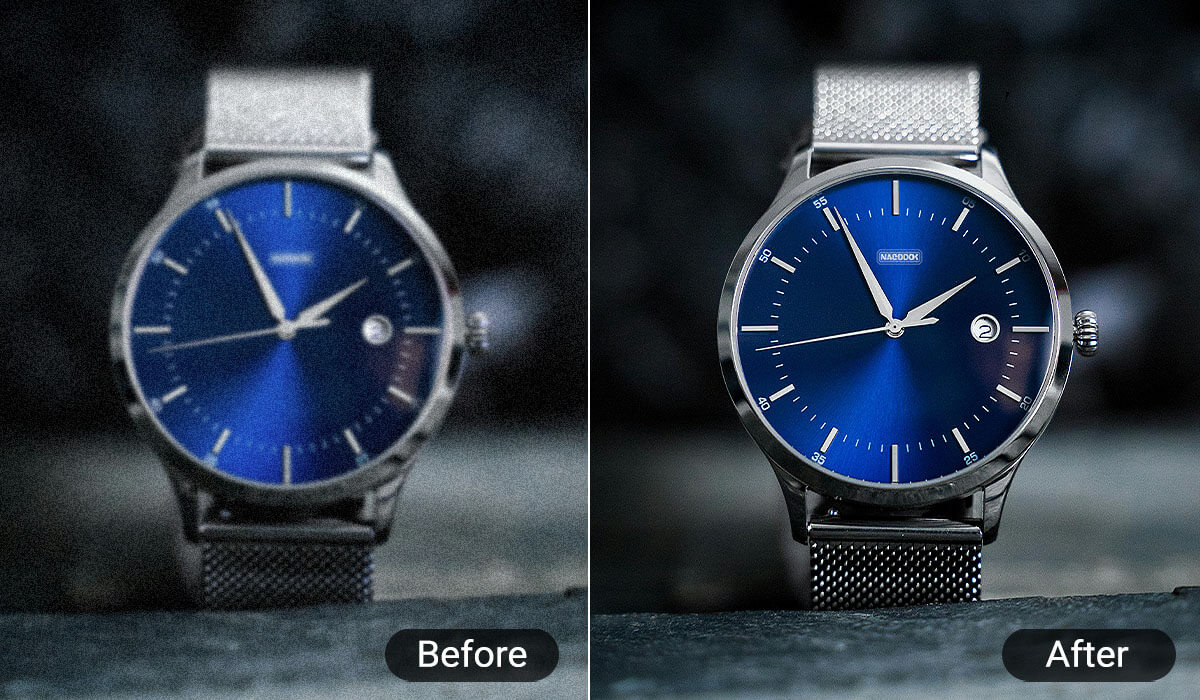
When selling products online, blurry or small images lose sales. Use our AI Upscaler to transform standard product photos into crisp, detailed images that build customer trust and allow them to zoom in on every feature. Clearer images lead to higher conversion rates.
Improving Visuals for Social Media Content
Don't let a great photo go to waste because it's low-resolution. Upscale old photos, cropped images, or screenshots to create stunning, scroll-stopping content for Instagram, Facebook, and more. Ensure your profile pictures and posts always look professional and sharp.
Upscaling Textures in Video Games and Virtual Reality
For game developers and 3D artists, texture quality is everything. Our AI can upscale low-resolution textures, enhancing visual fidelity and creating a more immersive experience for players without needing to recreate assets from scratch.

Restoring and Upscaling Animation or Anime Art
Fans and animators use AI upscale image to upscale classic or low-resolution animation frames and anime art, preserving original style while enhancing clarity for modern display standards by applying AI image upscaler technology.
Frequently Asked Questions (FAQ): AI Image Upscaler
What is an AI image upscaler?
An AI image upscaler is a tool that uses artificial intelligence to increase the resolution of a digital image. Unlike traditional methods that simply stretch pixels and cause blurriness, AI analyzes the image context to intelligently generate new pixels, resulting in a larger, clearer, and more detailed photo. The YouCam AI Image Upscaler uses advanced neural networks to enhance images up to 4K resolution without losing quality.
How does an AI image upscaler work?
AI image upscalers work by using deep learning models trained on millions of image pairs. When you upload your photo, the AI analyzes the existing pixels and predicts what the missing details should look like to create a high-resolution version. It effectively enhances your image by sharpening lines, reducing noise, and adding realistic texture, all while increasing the pixel count.
How can I upscale an image without losing quality?
The best way to upscale an image without losing quality is by using an AI-powered tool like the YouCam AI Image Upscaler. Traditional resizing tools cause quality loss because they stretch pixels. Our AI, however, generates new pixels that match the original content, preserving sharpness and detail. Simply upload your photo, and our tool will enlarge it by 2X or 4X while maintaining its original clarity.
Can I upscale batch images using AI tools?
Yes, many modern AI tools allow for batch processing to save you time. The YouCam AI Image Upscaler is designed for efficiency, letting you upload and enhance up to 50 images simultaneously. This is perfect for photographers, e-commerce store owners, or anyone needing to upgrade an entire photo collection at once.
What types of images can AI upscalers handle?
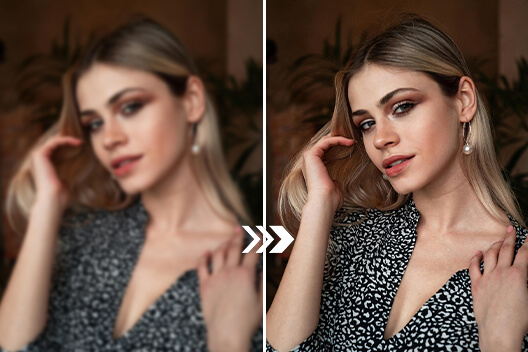
AI upscalers are incredibly versatile. The YouCam tool can handle a wide range of file formats including JPG, PNG, TIFF, and GIF. It excels at enhancing various types of images, such as portraits (improving skin texture and hair detail), landscapes, low-light photos, product photography, digital art, and even animation or anime stills.
How do AI image upscalers differ from traditional methods?
The key difference is intelligence. Traditional methods (like bicubic interpolation in Photoshop) are mathematical; they stretch existing pixels, which leads to blurriness and artifacts. AI upscalers are predictive; they analyze the image and generate brand new, contextually-aware pixels to fill in the gaps. The result is a genuinely enhanced image with more detail, not just a bigger, blurrier version of the original.
Is the YouCam AI Image Upscaler free?
Yes! You can start using the YouCam AI Image Upscaler for free. We offer 5 free credits upon signing up so you can upscale your photos to high-resolution instantly. Addtionally, you can get up to 2 free upscales per day. For more extensive use, we have affordable plans available.
What is the maximum resolution I can upscale to?
Our tool can upscale images up to a stunning 4K resolution. This makes it ideal for creating high-quality prints, professional digital displays, and crisp content for websites and social media where detail matters.
Can I use the AI upscaler on my phone?
Absolutely. The YouCam AI Image Upscaler is a fully web-based tool, meaning it works on any device with a browser, including desktops, mobile phones (iPhone and Android), and tablets. There's no need to download any software.

