






Add Black Background Online for Free
Instantly add a black background to your picture in just one click with YouCam, our free online editor!





Features of YouCam AI Background Changer
- Put Black Background on Image anytime: Perfect for bold product shots or stylish social media posts—just put a photo on a black background to create a sleek, high-impact look.
- Online Photo Editor: Use YouCam’s free online photo editor to add black background to photos online in just one click.
- Change the Background of a Picture to Black anywhere: Whether you're on mobile or desktop, YouCam makes it easy to add a black background to a picture instantly.
Change Background of Photo to Black for E-commerce
If you're selling online, a black background can make your products look sleek and modern. With YouCam’s online photo editor to add black background to photo, you can quickly create high-impact product images that grab attention!
Explore more: Add White BG to Photo, Add Beach Background, Black Background remover, White Background remover
Put Photo on Black Background for Social Media
Designing thumbnails or social media posts? Put pictures on black background to create bold, eye-catching visuals. It’s perfect for adding contrast, text overlays, or building a dramatic, professional look for your content.
Explore more: Mugshot Maker, Passport Photo Maker, Green Screen Photo Editor, Transparent Background Maker
Add Black Background to Photo Free for ID & Resumes
Need a more polished profile or ID photo? YouCam lets you add black background to a picture in just one tap—great for creating a clean, focused look for resumes, badges, or digital avatars.
Explore more: Background Color Changer, Logo Background Remover, Change Background, Remove Background, Remove Background From Signature
How to add black background to photos online?

Upload
Drop or select a photo that needs a black background.

Let AI Work Its Magic
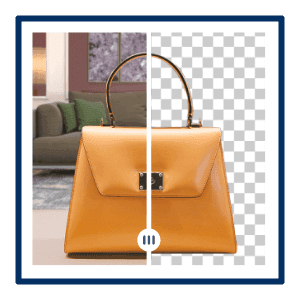
AI will instantly detect your subject and remove the background, so you can put a photo on black background without any manual editing.

Free & Easy Background Change Tool
No design skills needed. You can add a black background to a picture automatically with AI precision—perfect for creating bold, professional images in seconds.

Download & Share Instantly
After you add black background to a photo online, download your edited image in high quality. Ideal for social media, ID photos, e-commerce, or anytime you need to put a picture on a black background quickly and easily.
Add black background to photos FAQs
How can I make the background black in a photo using YouCam?
You can easily add a black background to a photo using YouCam’s AI Background Changer. Just upload your image, and the AI will automatically detect the subject and remove the background. Then, choose black from the background options to instantly put the photo on a black background. Available on mobile and desktop—edit anytime, anywhere. Try it free, and unlock unlimited access with a Pro account.
Is a black background good for a photo?
Absolutely. A black background creates a dramatic, modern look that draws attention to your subject. It’s perfect for product shots, professional portraits, social media graphics, or design layouts that need strong contrast. YouCam helps you achieve that high-impact look in seconds.
Can I add a black background to any photo using YouCam?
Yes! With just a tap, YouCam allows you to put a picture on a black background. The AI removes the original background and replaces it with black—no manual work required. It works with most photo types and is ideal for both everyday users and professional creatives.

